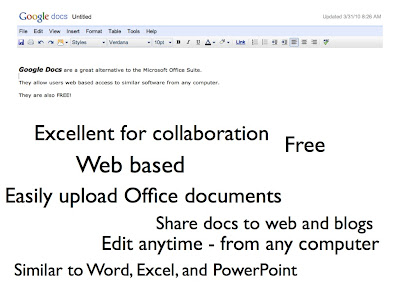
The April session of How Do I Do That will feature Google Docs and Sites. Google Docs are a great free alternative to the Microsoft Office Suite. The web based programs provide greater collaborative opportunities for teachers and students. The April session will also explore Google Sites. Google Sites provide a simple way to create websites and blogs.
The session will be open from 2-4pm in the B10 Computer Lab at Marshall Simonds.
For more information or questions please email me:
villano@burlington.mec.edu
Wednesday, March 17, 2010
As I have written on this blog before, I love working with technology at MSMS. However, I am sometimes frustrated by factors that can make the process more difficult.Some of these frustrations are:
1.The fact that we need to use so many different devices to accomplish collaborative projects in the classroom.
2.Not having enough devices, especially Internet connected devices, for each student to use.
3.Trying to use software that really doesn’t fit the project, curriculum, or collaborative needs of the students and teachers.
4.Trying to use devices and software that can be difficult to use with kids.
5.Spending too much time talking about all the devices.
These frustrations are not, in any way, isolated to the Burlington Public Schools.These are the frustrations that many educators in our country share.In most school systems, budgets or the lack of vision cause these frustrations to intensify.Although budgets can be an issue for us as well, we are lucky to have people in place with the right kind of vision for growth in technology in our school system.
I suppose it’s a bit of a dream and based somewhat on my preference for Apple products, but I think that the new iPad could be a solution to many of the frustrations I described. In fact, I think that the iPad could be a revolutionary device for education. I do think that laptops or minis are a great way to engage students using technology but I believe that the iPad will be more powerful in the classroom.
The iPad would allow our students to have ONE device for almost everything that they need for day-to-day lessons and activities in the classroom.The iPad could also allow us to expand the classroom and continue the education anywhere by having students use an Internet connected device that can tap into the cloud based resources we are implementing here in Burlington.
Here is a breakdown of some the positives and negatives about the iPad:
Digital textbooks on the iPad will provide a drastic change in how teachers can use their curriculum area books for classroom lessons and projects.Almost every major textbook publishing company, including all those that we use here in Burlington, are spending vast research and development money on the production of books specifically geared towards use on the iPad.These textbooks will be fully interactive and include embedded video, audio, web links, assessment opportunities, and discussion portals.
The iPad textbooks could also save money.Traditional textbooks average between $70 and $100.The iPad textbooks will cost less to buy and require less to maintain.As a Library Media Specialist, I am often rebinding, sending books out for rebinding, or purchasing replacements.The iPad will end this practice and provide schools with the opportunity to update all the time.Instead of purchasing new sets every few years, these new digital books will update information as needed, and many publishing companies have already stated that these updates will be free.
Another growing concern in public education has been the problems associated with students carrying books back and forth from school.While I understand that having students carry a device like the iPad back an forth could create some new concerns, it seems more productive than worrying about what books and how many books are in a student’s backpack everyday.
Collaborative education is more critical than ever in our schools.I know we have all heard it before - we must prepare our students for the global economy – we must prepare them for jobs that will require 21st century skills. But how often do we really spend time preparing students for these needs? How often do we really incorporate lessons that do this? And aren’t those 21st century skills that we haven’t completely taught yet going to be outdated soon?While I do think that having our students work with any Internet based device can help with these needs, I believe that the iPad could be the best choice yet.
Imagine a classroom where all the students are connected to the Wi-Fi on a device that has their textbook, access to all those embedded resources, and can be used to take notes, save Internet content, and most importantly share information with the teacher and other students instantly.Yes, these things can be done on a laptop or mini, but I don’t think they can be done nearly as easily or as efficiently.
Purchasing digital ebooks as textbooks may be the biggest downfall for a laptop in the classroom.These textbooks rarely have the kinds of embedded resources that the iPad books will contain.While the iPad reading experience may never be as good as traditional books, it appears to be a much better device for reading than a laptop or mini.
Student interest is also an important positive for me.I taught geography and history classes before I moved to the media position I have know.I always felt that if I could make the subject material more interesting, students would learn the material more effectively.Students truly learn when they are doing things that they enjoy.The use of technology like the iPad can often make students forget that they are even doing some of the things they often shut down with during more traditional instruction.I think most educators believe the same thing but not enough use the kinds of technology that kids care about in their curriculum as a way to accomplish this. I found that by using technology (that kids don’t even see as technology – things they see as just normal daily practice) students were more engaged.When I added new technology to classroom activities, the coolness factor also raised engagement.I think iPads will do some of both.Kids are connected all the time to Internet based digital devices like the iPod Touch. The iPad could help make their transition to educational use of technology easy and fun.Incorporating the iPad may help with this more than a laptop could.
The iPad may also allow us, as educators, to take a big step towards accepting digital resources in the classroom and help us prepare students for the potentially dangerous uses of technology.We can work on educating students more about the Internet, teach them how to be savvy about putting out personal information, try to stop them from using technology for bullying, and prepare them for a society in which the Internet will be included in nearly every activity they will face as an adult.
If we allow our students to use the iPad in class, it can reduce the stigmatism associated with kids using devices like cell phones while in school.Yes, students will find a way to use the iPad to communicate with each other about topics far more important to them than math class, but they will also communicate about topics from math class.
Paper consumption may be considered a less important detail, but having students perform educational tasks on an iPad could significantly reduce the need for paper in our classrooms. Obviously, we could purchase less paper products by moving away from traditional textbooks. Teachers and students can set up blogs, Nings, or wikis to share documents.The use of cloud based services like Google Docs or our new BLINK system will also help.I realize that this kind of change takes time and that our teachers will need to work on the implementation.I also realize that many teachers need help with this, but having a paperless classroom, or at least one that significantly reduces the amount of paper being used, really isn't that difficult to accomplish.
I have found that even though most of the world is trying to communicate digitally, schools are the by far the worst at this practice and drastically behind the business world. We spend too much time, effort, and money, creating materials digitally that just get copied on a Riso or Xerox machine.Whether the materials are for classroom use or public communication, we need to look at better ways to restrain paper consumption in our schools.
The lack of some features will make the iPad, at least the first generation version, less powerful in the classroom.The lack of Flash support while using the iPad’s web browser will be an issue when trying to access many educational websites. The lack of a camera will also mean that my frustration with multiple devices won’t completely go away. The lack of a dedicated USB port will be an inconvenience but something that can be overcome with additional accessories.The possibility of damage and theft will also be a potential issue but so will having our students use laptops or minis.
The verdict on the iPad is still a long way away.The first generation of the device is scheduled to ship in early April, so we have a lot of time to see if the iPad will revolutionize anything. I am betting it will.I believe it could be the best technology tool for education that I have seen in my lifetime.Ultimately, I think that the iPad could solve many of my biggest frustrations and help us to stop taking about all the devices and get to work with our students.
Click below to watch a video from Penguin Publishing about some of their upcoming content for the iPad:
Tomorrow, weather permitting of course, we should be delivering the rest of the "Bob carts". All of the elementary schools have received at least 2 carts by now, and have already put them to use. By the end of tomorrow, each school will have 5. The main idea behind these carts was to provide the convenience of mobile computing, with the stability of a wired connection. By using an NComputing solution, on a wheeled table, we can provide 4 usable terminals, in a small portable footprint. The computers were setup with elementary children in mind. They are loaded with reading, math, and other educational applications. Also included is a web browser, for accessing websites like BLink, as well as an office suite for word processing and spreadsheets. I'm sure the students are going to wear the letters off of the keyboards with all the use these carts will see. Please let us know of anything that could help improve these carts for the next go-around. Hopefully we will be able purchase more setups similar to this in the future. P.S. Special thanks to the maintenance guys for helping with the building and delivery.
The February session of How Do I Do That has been rescheduled for Tuesday, February 23. The session will be held in the Marshall Simonds Media Center located on the second floor at MSMS. The session will be open from 2-4:30pm. Teachers are invited to bring their school or personal laptop computers with them.
The February and March sessions of How Do I Do That will focus on the Burlington Public Schools BLINK system and the X2 Aspen Student Information System. These two new tools will be a vital part of teacher communication, collaboration, and access to student information.
Teachers in each school will receive specific training for Aspen in the coming months. The How Do I Do That sessions in February and March will serve as additional resources for teachers learning about the new system.
The sessions will help teachers with the transition to full time daily use of BLINK and Aspen.
As always, teachers may also join the sessions with specific questions about the use of technology in the classroom.
Please email me with any questions: villano@burlington.mec.edu
Friday was the kind of day that wears me out but also reminds me why I love helping with technology at Marshall Simonds as the Media Specialist. Technology is always an important part of the school day at MSMS. Overall, this past week was one of the busiest technology weeks I have ever had at our school. Everyday I assisted teachers and students with all kinds of technology. Each day, I scrambled to get minis or cameras or LCD projectors to teachers and students who needed them for class.
On Friday, however, technology integration was more active than I had ever seen it before at our school. Technology was being used in nearly every area of MSMS. Teachers and students were using many different forms of technology in many different ways. Lessons featured SMART Boards and LCD projection of material. Collaborative projects were completed using minis, iPod Touches, and cameras. Students were focused on creating and sharing content using various forms of media and presentation. Students and teachers all over MSMS used school technology equipment along with many of their own devices from home.
I am so proud of the teachers at MSMS for what they have tried to integrate into their daily activities over the past several years. Teachers have continuously updated their curriculum to include technology and have been open to new things each year. MSMS teachers are always ready to use the technology available to them at our school.
The inclusion of technology is not always easy. It takes time to plan lessons and projects and teachers often have to learn new skills just to carry out their ideas. Technology also doesn't always behave and, at times, it can be very frustrating to use new things in your classroom, but the teachers at MSMS have continued to confront the challenges and move forward.
I am more excited than ever about the way we use technology at Marshall Simonds. I believe that the efforts of our teachers to incorporate technology into the curriculum will continue to be a powerful tool in helping our students achieve more in both their academic and professional life.
Here is list of some of the technology, including BPS, teacher, and student equipment, being used at MSMS on Friday alone:
The January session of How Do I Do That? will be held on Tuesday, January 12 in the B10 Computer Lab at Marshall Simonds. The session will be open from 2-4:30pm.
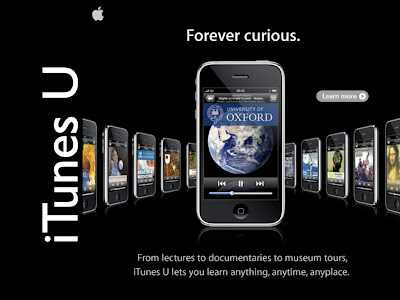
This month's session will feature an introduction to iTunes U. iTunes U is part of the Apple iTunes Store. iTunes U contains over 200,000 educational videos, documents, and audio from podcasts. The material is usually free to download and can be shared to iPods. Some content has been created to work with the iTouch as a tool in the classroom. iTunes U features lessons from some of the world's best colleges and universities as well as K-12 public schools throughout the US.
As most of you have already noticed, the web filtering rules have changed in the district. Please don't be alarmed. We are evaluating a new device to see if it meets our needs. Some of the sites that you visited previously might be coming up blocked. If this is the case, please follow the instructions and send an email to Abuse. This will be the quickest way for us to unblock all necessary sites.
Google wave is a new way to communicate for personal and work use. Check out the link and if interested, you can request an invite. If you really can't wait, send me an email. I have a few invites that I can give, but it's first come first served.
The December session of How Do I Do That? has been moved to Tuesday, December 15. The class will be held in the B10 Computer Lab at Marshall Simonds. The session is open from 2-4:30pm.
The December session will feature how to use video content in lessons and presentations. Subscription video services including Discovery Education's UnitedStreaming and BrainPOP will be used as well as free online video from YouTube and TeacherTube. Participants will learn ways to save videos and embed them into PowerPoint or class blogs for presentations. The Open Office presentation software, Impress, will also be introduced.
Due to some Wireless coverage issues that we have been dealing with at some schools, I decided to create a wired mobile cart "Prototype". The cart uses 1 computer tower and 3 VirtualTerminals to provide 4 working stations. This unit has been delivered to Pine Glen for testing. If all goes as planned, then we'll hopefully see alot more of these wheeling around your schools.
Give us a proposal explaining how you would use a Flip Video in your classroom. If we pick yours then we'll give you a Flip Video. There are 8 up for grabs. All entries must be in by November 30th, and submitted to Cindy M.
The November session of the How Do I Do That? program will be held on Tuesday, November 10 in the B10 Computer Lab at Marshall Simonds. The session will be open from 2:00 to 4:30pm.
The November session will feature the new Burlington Public Schools BLINK system. BLINK is a new web based network system for all BPS teachers, staff, and students. The cloud system will allow staff and students access to important software programs, documents, and email from any computer or mobile device that has an internet connection.
Participants in the November session of How Do I Do That? will be introduced to BLINK, learn about the log in process, and learn how to access software and documents. Open Office programs will also be introduced.
Click on the following link to read a blog post from Dr. Conti regarding BLINK:
The October session of the How Do I Do That? program will be held on Tuesday, October 13 in the B10 Computer Lab at Marshall Simonds. The session will be open from 2:00 to 4:30pm.
This month's session will feature information on blogs for educators. We will discuss the positive uses of blogs as an extension of the classroom. We will also look at the concerns that can potentially be faced using a class blog and how to be prepared for them. Teachers will have the chance to set up a blog for themselves.
Wordpress, Blogger / Blogspot, and Edublogs will be featured.
Please email me with any questions about the session: villano@burlington.mec.edu
As of this week all of the HP Minis have been delivered. The minis are available for sign out in BHS and MSMS Libraries, and in the 4 Computer Labs in the elementary schools. All of the mini's have 3 USBs, a multifunction card reader, wireless, webcam, and a monitor out. The front of the laptop has 2 buttons. 1 of the buttons is the power button (yellow circle), the other button is for the wireless (red circle).
SMART Board usage is growing fast in Burlington this year. These interactive boards give teachers many options for classroom instruction and student participation. Teachers can use the SMART Notebook, interactive websites, Microsoft Office docs, Open Office docs, videos, images, and just about anything else that runs on a computer.
The SMART Board is most powerful when you use the SMART Board Tools. These adjustable tools can be used in any program and give you the power of many of the features of SMART Notebook anytime you want them. The SMART Board Tools can be kept open at all times. You can usually open the SMART Board Tools by going to the START menu and clicking on the list for SMART Board Drivers.
Click on the following link to view information on many of the items located in the SMART Notebook Toolbar and Desktop Tools:
Every employee in the school district has access to a network folder, or U: Drive. This network folder is backed up frequently in an effort to preserve precious data. Desktops and laptops are NOT backed up on the network, so any data saved locally (c: drive, My Documents, etc.), could be lost in the event of a hard drive failure.
Each user’s U: drive is mapped automatically at login and can be accessed by opening up my computer. For further assistance or any questions, contact your building technology rep.
If you are trying to incorporate more technology into your classroom, the resources available can be overwhelming. One of the best ways to find these resources is a simple Google or Bing search but we rarely have the time to look through thousands of pages of results.
Over the past few years I have made a list of some great free content available online. I have linked 4 pages of interactive technology resources below. Many of the pages have content perfect for using with a SMART Board. Some of the pages include games for play and learning.
If you are starting to use a SMART Board in your classroom, there are many different ways to make the educational experience more interactive. Along with the SMART Notebook and its Essentials for Educators Gallery, SMART Boards are perfect for using interactive resources such as simulations, educational games, images, and videos. Many of the links included in the following pages include these kinds of resources.
One of the links is to the Fox Hill Elementary School website where Mr. Donoff has created several excellent lists of interactive pages.
Please click on the links below to open the pages: